
This title is a mouthful, but we’ve got dual ISP connections terminating on our active/passive HA Palo Alto’s. Historically, we’ve only had a single S2S VPN to our Azure environment, however we are now migrating to a new pair of PA’s that I need to have running concurrently. To give slightly more overview of our Azure environment, we’ve got 2 Virtual WANs setup with a single Virtual HUB each. Within these HUBs, we have a couple of S2S VPN connections, some of which use BGP for dynamic routing. The goal here is to leverage the existing Azure VPN site, and simply add a new link for the second ISP connection from the new pairing of PAs. The main documentation for this is found here: https://learn.microsoft.com/en-us/azure/virtual-wan/virtual-wan-site-to-site-portal.
First problem: The Azure portal would not allow me to create a new link using the same BGP peer IP as the other link – ISP 1.
Fix: Add additional IPv4 address to the sub-interface (e.g. BGP1: 10.10.100.2/32, BGP2: 10.10.100.3/32) on the PA side to accommodate this.
Second problem: I added the new link to the site, but the Azure portal would not let me configure the link from within the VPN site page. Every time I hit Create, the page just flashed, and nothing happened.
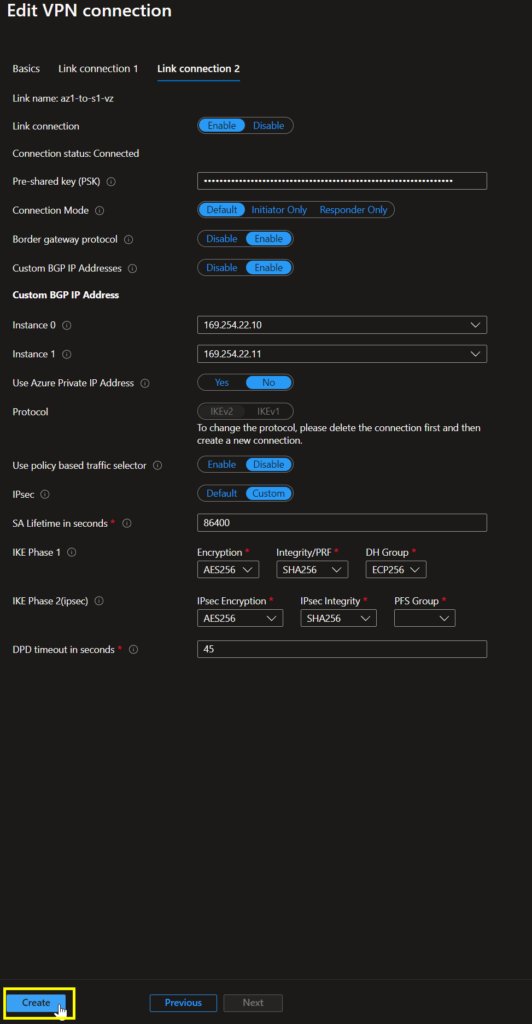
Fix: Disconnect that VPN site & reconnect. Yep. It really was that simple, though it was annoying to have to bring down the VPN at all as this takes a couple minutes.
Third problem: Configuring the new BGP peering on the PA side errored out when I tried to create a 2nd peer with the same Peer Address.
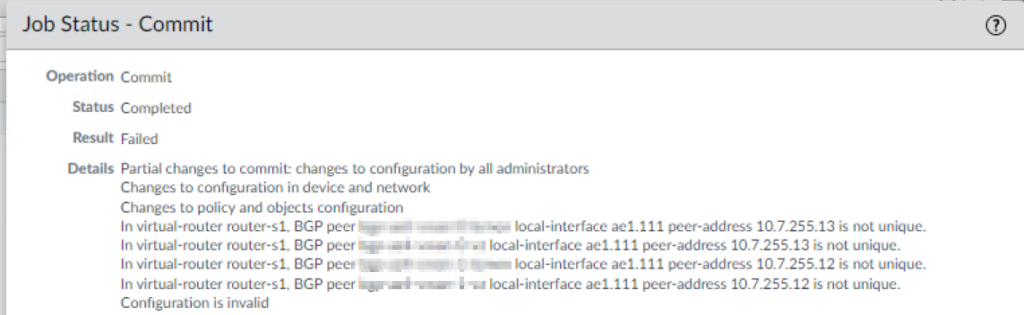
Fix: This was a little more complicated. I knew we had only ever used the default Azure BGP peer IPs and I didn’t know you could add custom ones until I read through this document: https://learn.microsoft.com/en-us/azure/vpn-gateway/bgp-howto#enable-bgp-for-the-vpn-gateway. Basically, Azure allows the use of the following APIPA ranges – 169.254.21.0/24 & 169.254.22.0/24 – and you may setup as many custom BGP IPs as you need. The caveat with this setup is that your remote peer must then use an APIPA IP (169.254.0.0/16). Ugh. Back to the PA side… Instead of using 10.10.100.2 & 10.10.100.3, I chose 169.254.19.10 & 169.254.20.10.
Note: When APIPA addresses are used on VPN gateways, the gateways do not initiate BGP peering sessions with APIPA source IP addresses. The on-premises VPN device must initiate BGP peering connections.
That’s all there was to it! Now, I’ve got dynamic routing working from both pairs of HA PA’s and can gracefully cut over to the new pair. I’m leaving a lot of the PA config details out of the post here, but we’ve also got OSPF setup for pulling in routes from a Cisco Meraki MX VPN concentrator, so there’s a redistribution profile which lets me control what I’m sending across via BGP. If there are questions around that setup, I can edit and expand this post to include that detail.
Lastly, I am not seeing proper ECMP traffic flow yet, so that may be a post for another time, however I have validated that if one route drops, i.e. I remove it from the PA side, the alternate PA pairing immediately picks up.
Other helpful links: